
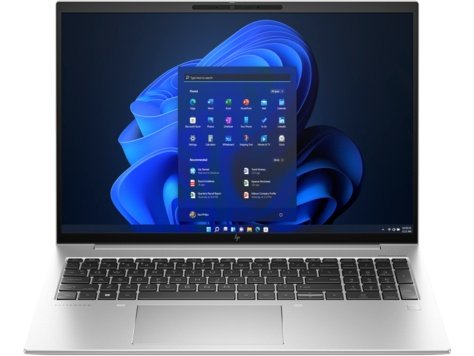
Features & Specifications
| Category | Details |
| Processor | 13th Gen Intel options (e.g. i5-1335U, i7-1355U, i7-1360P, i7-1370P) |
| Graphics | Integrated Intel Iris Xe Graphics |
| RAM | 8 GB up to 64 GB DDR5, dual SO-DIMM slots |
| Storage | NVMe SSDs, from 512 GB upwards; high capacity variants available |
| Display | 16.0″ WUXGA (1920×1200) IPS; some models offer OLED / high refresh, eye-care features; anti-glare |
| Brightness / Colour | Standard panels around 400 nits with full sRGB in many versions; premium versions include wider gamut |
| Ports & Connectivity | 2 × USB-C (Thunderbolt 4), USB-A, HDMI 2.1, audio jack, WiFi 6E, Bluetooth 5.3, optional WWAN |
| Webcam & Audio | 5 MP IR webcam, privacy shutter, dual-array microphones, stereo speakers (Bang & Olufsen in many builds) |
| Battery | Options around 51 Wh or larger 76 Wh packs, depending on version |
| Weight & Dimensions | Approx 1.73 kg; chassis built with metal, solid for portable large-screen work |
| Build & Design | All-metal construction; keyboard is spill-resistant; sleek but robust design |
| Security Features | Fingerprint reader optional, IR face recognition, BIOS security, HP Wolf security features, privacy tools |
| Display Comfort Features | No screen flicker (PWM), good viewing angles, blue-light reduction; anti-glare surfaces help usability in bright environments |
Expert Review & User Experience
From a UX & CRO perspective, the EliteBook 860 G10 delivers well for users who value screen real estate and security without sacrificing portability too much:
- The 16-inch display with a 16:10 aspect ratio gives more vertical space, allowing users to see more of documents and spreadsheets without scrolling constantly.
- The anti-glare IPS panel plus eye-care features like blue-light reduction and no PWM flicker help reduce strain during long hours of work.
- The chassis is solid and built for business: metal body, strong build, good keyboard layout with UK standard options, decent trackpad, and premium webcam/imaging for video calls.
- The performance is strong enough for business workloads (multitasking, virtual meetings, office productivity, moderate data loads). It may not be ideal for high-end graphics work or gaming, but those aren’t the target audience here.
- Connectivity is generous, especially with modern ports like Thunderbolt 4, which helps with docking, external displays, and future-proofing. The inclusion of USB-A ports means compatibility with legacy devices.
- Battery life depends on configuration: lighter processor + standard display yields better endurance; high performance or premium display versions reduce battery longevity but are still respectable for work sessions.
Pros & Cons
Pros:
- Large 16-inch display gives extra workspace; good for multitasking and productivity
- Strong build quality and premium materials
- Excellent security and privacy features built in
- Good port selection, modern and legacy included
- Eye-friendly display features (anti-glare, low blue light, no flicker)
- Flexible configurations allow matching for budget or performance needs
Cons:
- Heavier and less compact vs. 14-inch and 13-inch models — more to carry
- Premium display / high performance variants significantly increase cost
- Integrated graphics only — limited for creative / GPU-heavy workflows
- Battery life drops off with brighter display or heavier workloads
- Some optional features may not be present in base models (e.g. webcam enhancements, security extras)
Verdict & Buying Advice
If you are a UK professional who works with large documents, presentations, and multitasking across multiple apps, and you want a spacious screen with strong security, the HP EliteBook 860 G10 is a solid investment.
To get the best value:
- Choose at least 16-32 GB RAM and 512 GB SSD — this will cover most business uses without lag.
- Go for standard display options if budget is tight; opt for the premium display only if you need colour accuracy or spend work hours in bright lighting.
- Check that your model includes the security features you care about (IR webcam, fingerprint, privacy shutter) as some extras are optional.
- For portability, consider whether you need to travel frequently: the size/weight is more burdensome than 14-inch machines.

Reviews
There are no reviews yet.