
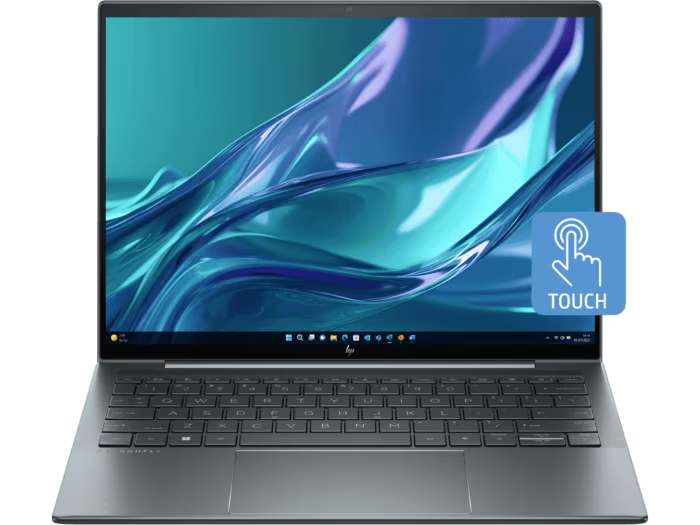
Features & Specifications
| Category | Details |
| Processor | Intel 13th Gen (e.g. i5-1335U, i7-1355U) |
| Graphics | Integrated Intel Iris Xe |
| RAM | Up to 32 GB LPDDR5 (soldered) |
| Storage | SSD, up to 2 TB NVMe Gen 4×4 |
| Display Options | 13.5-inch 3:2 aspect ratio; WUXGA+ (≈1920×1280) or high resolution panels; touch and non-touch versions; optional privacy or reflection-reducing treatments |
| Brightness / Colour | Around 400 nits for many IPS models; premium display variants (OLED, Sure View etc.) offer higher contrast or more vivid visuals |
| Ports & Connectivity | 2× USB-C / Thunderbolt 4 ports; USB-A port; HDMI; headphone/mic combo; WiFi 6E; Bluetooth 5.3; optional WWAN (4G/LTE) |
| Webcam & Audio | 5MP webcam in many models; dual array microphones; quad speakers with premium tuning |
| Battery & Weight | Battery capacity varies, common ~68 Wh in many units; weight ≈ 0.99 kg (≈1 kg) |
| Body & Design | Premium materials (aluminum or magnesium alloy), ultra-thin chassis (≈16.4 mm), stylish design, durable hinges |
| Security Features | TPM 2.0, HP Wolf Pro Security editions, Tamper Lock, ambient sensors, privacy screen options |
| Display Comfort & Extras | Anti-glare / low-reflection finishes; backlit keyboard; ambient light sensors; 180-degree or flat open in some builds |
Expert Review & User Experience
From a UX & CRO perspective, the Dragonfly G4 is built to attract buyers who value premium quality, portability, and status in addition to performance.
- The laptop’s ultralight weight (~1.0 kg) makes it ideal for carrying between meetings, working on the go, or commuting without feeling burdened.
- Display options are good, especially with the 3:2 aspect ratio which gives more vertical space — helpful for reading, writing, coding, document work. The 400-nit panels are nicely usable in bright indoor settings, though outdoor visibility varies by variant.
- Performance from the 13th Gen Intel chips is solid for productivity tasks: office apps, video conferencing, web work. Integrated graphics handle casual use and photo editing fairly well but aren’t meant for gaming or heavy GPU-demanding workloads.
- Security and business features are strong draws: privacy options, HP’s security suite, tamper sensors etc., help with trust and are appealing for corporate buyers.
- Battery life seems good in light to moderate usage; heavier workloads or high brightness displays reduce run time. Configurations with larger battery capacity perform better.
Pros & Cons
Pros:
- Ultra-light weight (~1 kg) makes it extremely portable
- Premium look and feel with high build quality
- Very good security and privacy features
- Excellent display options and comfort for long usage
- Strong connectivity with modern ports and wireless tech
Cons:
- Memory is soldered; limited or no upgrade in RAM for many models
- Premium display versions add significantly to cost
- Battery life drops under heavy usage / bright display conditions
- Not meant for graphics-heavy workloads or gaming
- Some variants may have weaker outdoor visibility depending on panel finish
Verdict & Buying Advice
For UK professionals who value portability, prestige, and secure business features, the HP Dragonfly G4 is a compelling choice. It’s ideal for executives, consultants, remote workers, or anyone who wants a stylish, high-end laptop that doesn’t compromise performance.
If considering purchase:
- Opt for a configuration with at least 16 GB RAM and 512 GB SSD to balance price and performance well.
- If you work outdoors or often in bright office settings, try to get a variant with a brighter panel or anti-glare / privacy screen.
- Check for security bundles and warranty options; these add value for business users.
- If weight and thickness are key (e.g. if you travel a lot), make sure the model you pick is the ultralight one rather than heavier premium display variants.
Reviews
There are no reviews yet.