

Features & Specifications
| Category | Details |
| Processor | 13-th Gen Intel Core (e.g. i7-1355U / i7-1365U) |
| Graphics | NVIDIA RTX A500 (4 GB GDDR6) + Integrated Intel Iris Xe |
| RAM | 16-32 GB DDR5, dual-slot SO-DIMM; upgradable to 64 GB |
| Storage | NVMe SSD (512 GB / 1 TB typical); high performance SSDs in premium variants |
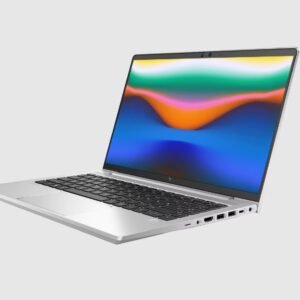
| Display | 14-inch, 1920×1200 (WUXGA) IPS, anti-glare; some models have 400 nits brightness |
| Aspect Ratio & Viewing | 16:10 aspect ratio; wide-viewing angles; handful of models with touch / non-touch options |
| Ports & Connectivity | 2 × USB4 / Thunderbolt 4, USB Type-A ports, HDMI, WiFi 6E, Bluetooth 5.3 |
| Webcam & Security | 5 MP Webcam with privacy shutter, IR options, fingerprint reader, TPM 2.0, smart card reader in select units |
| Weight & Dimensions | ~1.45 kg; ~31.56 × 22.43 × ~2.0 cm |
| Battery & Charging | 51 Wh battery; power adapters ~65W; fast charging on some models |
| Build & Design | Durable workstation build; spill-resistant keyboard; premium chassis |
| Other Features | Ambient light sensor; motion/hall sensors; thermal sensors; adaptive colour features; security sensors (tamper lock etc.) |
Expert Review & User Experience
From a UX & CRO perspective, the ZBook Firefly 14 G10 is designed to impress UK professionals who need workstation performance but also demand portability.
- Performance in a compact form: With the RTX A500, this laptop handles tasks such as CAD, 3D modelling, scientific/engineering applications, and GPU-accelerated workloads better than typical ultrabooks. It gives a strong return for users who need power on the go.
- Display usability: The 14-inch WUXGA panel with a 16:10 aspect ratio gives more vertical space (helpful in spreadsheets, code editors, or multi-window work). Anti-glare helps reduce eye strain, especially in bright office settings or near windows.
- Port selection allows connectivity to modern docks and legacy devices. Thunderbolt / USB4 helps with fast data transfer, external displays; USB-A and HDMI preserve compatibility with older hardware.
- Security & privacy are taken seriously: privacy shutter, TPM, fingerprint reader, smart card options, sensor suite. Good for professionals dealing with sensitive data or working in shared spaces.
- Weight vs functionality trade-off: At ~1.45 kg, it’s heavier than basic ultrabooks, but given the GPU & workstation class performance, it’s still quite portable for its category. Battery life depends a lot on usage — lighter workloads will stretch the battery; GPU use or high brightness settings reduce run time.
Pros & Cons
Pros:
- Strong workstation GPU option in a relatively small 14-inch body
- Excellent build quality & durability expected of a mobile workstation
- Good security and privacy features included
- Ample RAM & storage for demanding apps; upgradable memory helps future-proofing
- Flexible port selection & modern connectivity
Cons:
- Battery life drops when using GPU, high brightness or heavy workloads
- More expensive than ultrabooks without dedicated GPU; price increases steeply with premium options
- Heavier than basic thin-and-light laptops
- Some models may have lower brightness displays in base configuration
- Integrated graphics for lighter tasks stronger in variants without the discrete GPU, but limited compared to dedicated workstation GPUs
Verdict & Buying Advice
If you are a UK professional who does creative work, engineering, 3D modelling, or anything that benefits from a dedicated GPU and you need mobility, the HP ZBook Firefly 14 G10 is one of the best options in its class.
To get the best value:
- Aim for 32 GB RAM and at least 512 GB SSD if you plan to run heavy applications or multitask.
- Choose the brighter, higher quality display variant if you often work outdoors or in bright offices.
- Make sure your configuration includes the security features you need (camera privacy shutter, fingerprint reader, smart card, etc.).
- If portability is more important than GPU power, consider going for variant without RTX A500 to save weight, cost, and improve battery life.
Reviews
There are no reviews yet.