
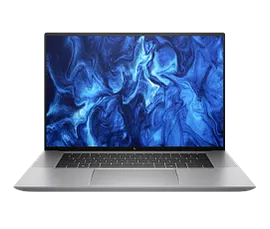
Features & Specifications
| Category | Details |
| Processor Options | 13th Gen Intel Core (e.g. Core i9-13900H, Core i7-13800H) |
| Graphics | NVIDIA RTX (Ada / RTX A-series options) and integrated Intel Iris Xe |
| RAM | Up to 64 GB DDR5 |
| Storage | NVMe SSD options up to 4 TB |
| Display | 16.0″ IPS / OLED options: WUXGA (1920×1200), WQUXGA (3840×2400), up to 120 Hz refresh |
| Brightness & Colour | High-end panels with full-spectrum colour (e.g. 100% DCI-P3), up to ~400+ nits in IPS, OLED versions with deeper contrast |
| Body / Build | Aluminium chassis; sleek and thin form factor |
| Ports & Connectivity | Thunderbolt 4 / USB-C, USB-A ports, HDMI, Wi-Fi 6E, Bluetooth |
| Webcam & Audio | High-resolution webcam options, privacy shutter; dual-array microphones; premium speakers |
| Battery & Weight | Battery capacity varies by model; weight approx 1.73 kg per testing results |
| Dimensions | Approx 356 × 242 × 18 mm |
| Cooling & Thermal Design | Dual fans, vapor chamber / heat pipe systems for sustained performance |
| Features / Extras | AI noise suppression, HP Wolf Pro Security editions, security & BIOS features |
Expert Review & User Experience
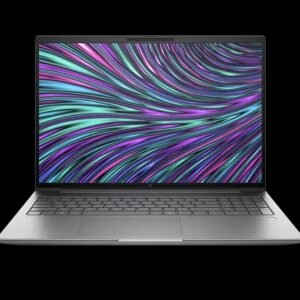
From a UX & CRO perspective, the ZBook Studio G10 aims to appeal to buyers who demand workstation-level performance in a refined, portable package.
- The 16-inch display, especially with 16:10 aspect ratio, gives more vertical screen space—great for creative work, editing, design, and multitasking.
- OLED and high-resolution display options offer vivid colours, deep blacks, and good contrast — especially beneficial for media, video editing, and visual applications.
- CPU + GPU combos make this laptop viable for demanding tasks like 3D rendering, CAD, ML workloads, image/video editing. The discrete RTX / workstation GPU options are a big advantage over general-purpose laptops.
- The body is luxurious and slim for its class, attracting professionals who carry laptops frequently.
- Ports help reduce adapter dependency: mix of modern (Thunderbolt) and legacy interfaces ensures usability in many environments.
- Security and enterprise features (security suite, firmware protections, privacy options) give confidence to business users handling sensitive work.
- In real use, battery life will vary significantly depending on display choice and GPU load — lighter usage may last a full workday, heavy tasks will drain faster.
- Thermal management is critical. Under load, fans will ramp, so the chassis design and cooling efficiency are important for sustained performance.
Pros & Cons
Pros:
- Powerful performance with top-tier CPU + GPU in a relatively slim form
- Excellent display options (IPS or OLED, high resolution, colour accurate)
- Strong security and professional features built in
- Good port selection with modern interfaces
- Premium build and design, fitting for creatives and professionals
- Dual-user upgradeability (RAM, storage) in many models
Cons:
- Premium variants carry a high price premium
- OLED / high-resolution displays consume more power — battery drops under heavy use
- At ~1.73 kg, not ultralight — noticeable when commuting
- Integrated graphics variants are less capable for pro workloads
- Fan noise may increase under sustained load
Verdict & Buying Advice
For UK professionals needing a workstation-class laptop with serious performance and refined design, the HP ZBook Studio G10 is a strong option. It bridges the gap between a creative workstation and portable laptop.
To pick the right configuration:
- Go for at least 32 GB RAM and 1 TB SSD if your workloads involve heavy assets or multitasking.
- Prefer the OLED / high-res display if you do colour-sensitive work, media editing, or want visual excellence.
- Ensure the model includes the discrete GPU option if you rely on GPU-accelerated workflows.
- Assess your portability needs — if you travel frequently, consider how much weight you can carry every day.
Reviews
There are no reviews yet.