
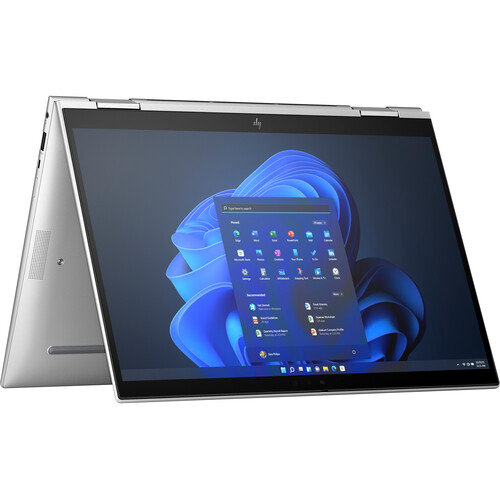
Features & Specifications
| Category | Details |
| Processor | Intel 13th Gen options (e.g. Core i7-1365U / i7-1355U / Core i5 variants) |
| Graphics | Integrated Intel Iris Xe Graphics |
| RAM | Up to 32 GB LPDDR5 |
| Storage | SSD options up to ~1 TB NVMe PCIe |
| Display | 13.3-inch WUXGA (1920×1200), touch IPS, anti-glare; typical versions ~250-400 nits brightness |
| Convertible / 2-in-1 | Yes — flip / hinge design allows tablet mode, tent, laptop etc. |
| Ports & Connectivity | 2 × Thunderbolt 4 / USB-C, 2 × USB-A, HDMI 2.1, headphone/mic combo, Wi-Fi 6E, Bluetooth 5.3 |
| Webcam & Audio | IR / HD webcam with privacy shutter, dual stereo speakers, dual array microphones |
| Battery | ~51 Wh battery; 3-cell design |
| Weight & Dimensions | Around 1.30-1.35 kg; thin, compact footprint for a convertible |
| Build & Design | Premium chassis, spill-resistant keyboard, backlit keyboard, durable hinge mechanism |
| Security Features | Fingerprint reader, TPM 2.0, HP Wolf Security features, BIOS protections, privacy options for display |
Expert Review & User Experience
From a UX & CRO perspective, the EliteBook x360 830 G10 offers several strengths for UK professionals:
- Flexibility & Portability: The 2-in-1 form factor means you can shift between laptop, tent, and tablet mode — good for presentations, meetings, or using it on the move. Its size & weight make it travel friendly.
- Display & Touch: The touch WUXGA panel gives crisp visuals and better vertical space for productivity. Higher brightness models improve usage in bright environments. Anti-glare helps reduce reflections. Being able to fold the screen adds intuitive interaction modes (touch + pen).
- Performance & Responsiveness: With 13th Gen CPUs and LPDDR5 RAM, performance for business needs (apps, spreadsheets, video calls) is smooth. Integrated graphics are fine for typical office and streaming workloads, though not for heavy gaming or large-scale graphics editing.
- Security & Privacy: The inclusion of TPM, fingerprint reader, privacy shutter/IR camera, plus HP’s enterprise security suite appeals to users who handle sensitive data or work often in public/varied locations.
- Connectivity & Ports: Good mix of modern ports ensures compatibility with docks, older equipment, external displays. Thunderbolt 4 helps with high speed data, external display outputs.
- User Comfort: Backlit keyboard and responsive touchpad increase comfort. Convertible hinge must be sturdy — ideally feels solid in all modes. Battery life should be enough for a full workday under moderate usage; heavy use or brightness reduces time.
Pros & Cons
Pros:
- Highly flexible 2-in-1 design with laptop + tablet modes
- Solid build & premium fee
- Good port variety, modern connectivity (Thunderbolt, USB-C + legacy USB-A)
- Strong security and privacy features included
- Touchscreen & display responsive; higher brightness versions better outdoors
- Lightweight for its class
Cons:
- Integrated graphics only — limits on gaming or creative workloads
- Base display brightness is modest on some models; premium screen versions cost extra
- RAM sometimes soldered or limited upgrade options in some configs
- Battery life will drop under heavy usage or in tablet mode
- Prices of higher spec variants can push past affordable thresholds
Verdict & Buying Advice
The HP EliteBook x360 830 G10 is an excellent option for UK professionals who need a 13-inch convertible laptop with strong security and flexibility. Great for people working in hybrid or on-the-move setups.
Best value config: Aim for at least 16 GB RAM and 512 GB SSD to avoid performance constraints. Invest in the brighter display if you work outdoors or in bright environments.
If you often draw, annotate, or need stylus support, check which models include pen input and the quality of touch panel. For creative tasks like photo/video editing, consider upgrading GPU or choosing a laptop better suited for graphics work.
Reviews
There are no reviews yet.