
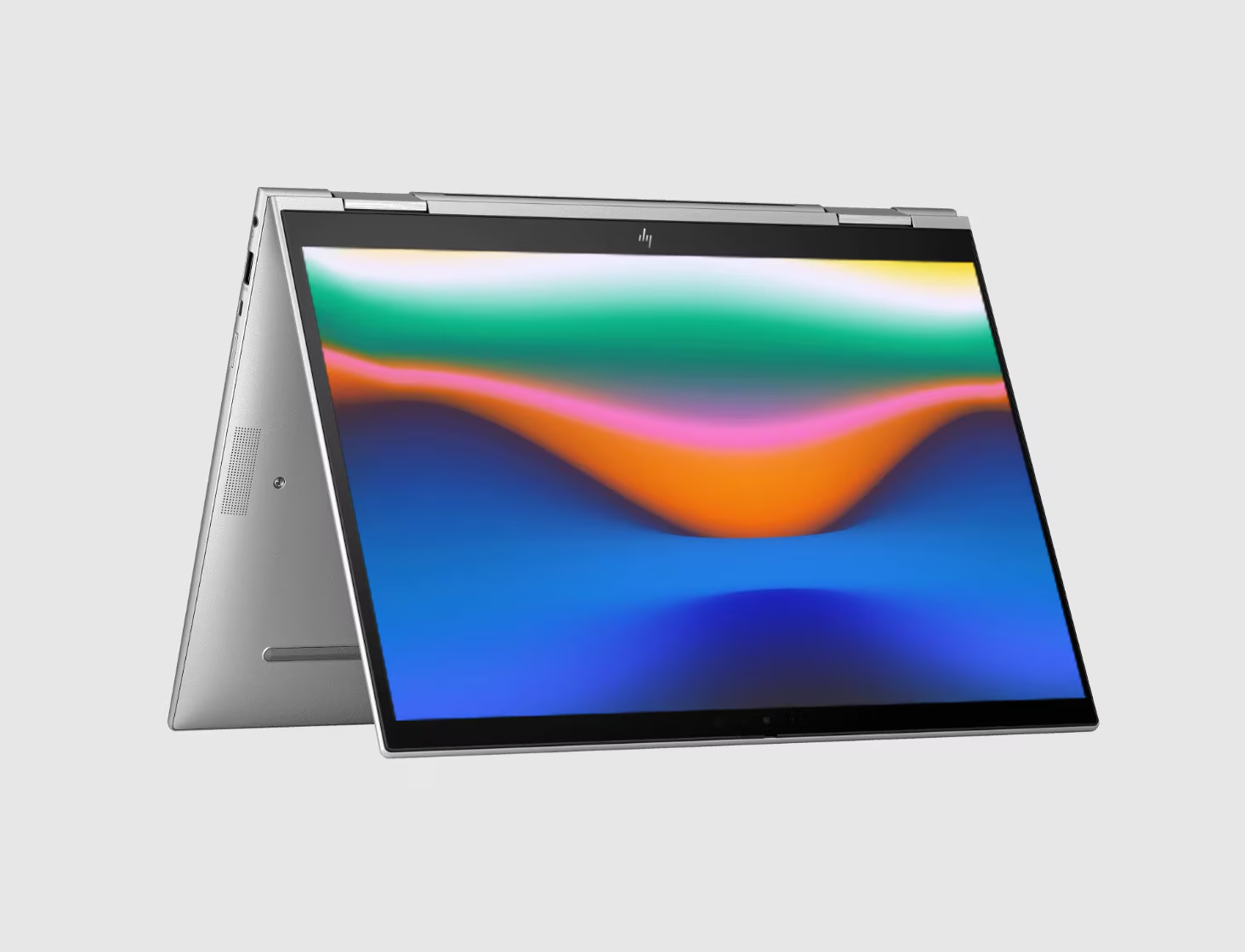
Features & Specifications
| Category | Details |
| Processor | Intel 13th Gen CPUs — U-series and P-series options (examples: i5-1335U, i7-1355U, i7-1365U, i7-1370P) |
| Graphics | Integrated Intel Iris Xe Graphics |
| RAM | Up to 64 GB DDR5, dual-channel SO-DIMM slots (user-accessible) |
| Storage | Up to 2 TB NVMe Gen 4×4 SSD (encrypted options in many builds) |
| Display Options | 14-inch 16:10 IPS; various panel choices: FHD (250-400 nits), FHD SureView privacy, high brightness, or WQXGA 120Hz panel |
| Weight & Dimensions | Starting around 1.18-1.19 kg; size about 315.7 × 224.4 × ~17.9-18 mm |
| Build & Design | Premium magnesium / alloy body; clamshell form; 180-degree hinge; spill-resistant keyboard; sleek, thin bezels |
| Ports & Connectivity | 2× USB-C / Thunderbolt 4 with PD & DisplayPort; USB-A ports; HDMI 2.1; headphone jack; WiFi 6E; Bluetooth 5.3; optional SIM/WWAN in some variants |
| Webcam & Audio | 5 MP camera with privacy features; dual microphones; Bang & Olufsen speakers; noise reduction features |
| Battery & Power | Battery options ~51 Wh for “long life”; also lighter battery configurations; supports USB-C PD charging; 65 W charger typical |
| Security Features | TPM 2.0; fingerprint reader; BIOS/firmware protections; optional privacy screens; enterprise security suites bundled in some models |
| Display Comfort & Extras | Anti-glare finishes; low blue-light options; ambient light sensors; keyboard backlight; premium touchpad/clickpad features |
Expert Review & User Experience
From a UX & CRO standpoint, the EliteBook 1040 G10 is positioned strongly for UK users wanting a premium experience:
- Portability meets performance: It’s light enough for travel with approximately 1.18-1.19 kg weight, yet powerful enough with P-series options for demanding work. It makes a good companion for those moving between home, office, meetings.
- Display flexibility matters: The variety in panels (privacy, high brightness, higher refresh rate) means users can choose based on their environment. If you work in bright rooms or near windows, upgrading to 400+ nit or privacy panels adds real value.
- Security built in: The presence of hardware security (TPM, fingerprint, BIOS security), optional privacy screen, etc., helps reduce friction for business buyers worried about data protection.
- Upgradeability: Dual memory slots and ability to use up to 64 GB RAM plus SSD upgrades give better longevity & better user satisfaction (users feel they’re investing in something future-proof).
- Connectivity & ports: Having both USB-C / Thunderbolt 4 and USB-A + HDMI helps reduce the need for adapters. Good for compatibility with both modern docks and older peripherals.
- Battery life: Real-world usage should get a full day or close, especially with moderate display brightness and light workloads. Heavy workloads, high brightness, or running many connected peripherals will reduce battery life.
Pros & Cons
Pros:
- Excellent build quality and materials — durable and premium feel
- Multiple high-quality display options (privacy, brightness, refresh rate)
- Strong performance from both U-series and P-series Intel 13th Gen CPUs
- Security and privacy features are well integrated
- Good upgradability (RAM & SSD) for longevity
- Great mix of ports — modern and legacy support
Cons:
- Price increases significantly with premium display & security add-ons
- Integrated graphics only — not suited for high-end gaming or graphics-intensive workflows
- Battery life varies a lot depending on display choice and workload
- Optional features (WWAN, privacy screen, high brightness) may not be standard in all configurations
- Being thin & light sometimes means trade-offs in cooling under sustained heavy loads
Verdict & Buying Advice
If you are a UK professional who travels, gives presentations, handles sensitive data, or simply wants a stylish, premium 14-inch laptop that looks & feels like a top-tier ultrabook, the HP EliteBook 1040 G10 is a strong contender.
To get the best value:
- Aim for at least 16 GB RAM & 512 GB SSD, unless budget is tight.
- If you move around or work in bright lighting, select a higher brightness panel or privacy screen.
- Check security & privacy options in the variant you buy. Don’t assume all come with premium features.
- Consider future usage—if you expect to run heavier applications or want max lifespan, investing in P-series CPU might be worth the extra cost.
For users with lighter needs (web, office apps, video calls) the base model will serve well. For those doing more, hunting deals on higher specs helps.
Reviews
There are no reviews yet.