
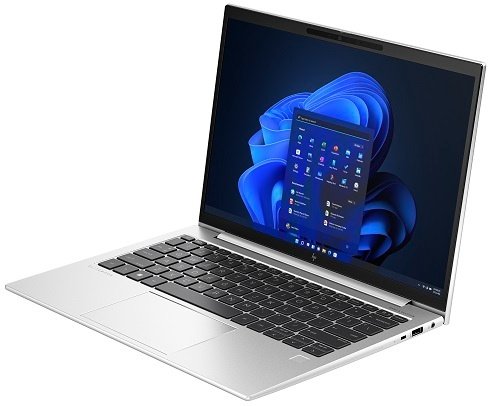
Features & Specifications
| Category | Details |
| Processor | 13th Gen Intel Core i5-1335U / i7-1355U / i7-1365U |
| Graphics | Integrated Intel Iris Xe Graphics |
| RAM | Up to 32 GB LPDDR5 (soldered or on-board in many models) |
| Storage | NVMe SSD options, commonly 512 GB; higher sizes in premium variants |
| Display | 13.3-inch, WUXGA / FHD+ (1920×1200), IPS; anti-glare; options with ~250-400 nits brightness; some models with privacy screen (SureView) |
| Ports & Connectivity | 2× USB Type-C (Thunderbolt 4 / USB4), 2× USB-A, HDMI 2.1, 3.5mm audio jack, Wi-Fi 6E, Bluetooth 5.3, optional 4G LTE in some variants |
| Keyboard & Input | Backlit keyboard (UK layout), premium keys, spill resistant; glass or precision touchpad/clickpad |
| Webcam & Security | HD / 5 MP webcam with privacy shutter / IR camera options; Fingerprint reader; Trusted Platform Module (TPM 2.0); HP Wolf Security / security suite options; BIOS protection features |
| Battery & Weight | 3-cell battery (≈ 51 Wh in many models); up to ~15 hours in light usage; weight around 1.26 kg |
| Dimensions | Approx 30.0 × 21.5 × ~1.9-2.0 cm |
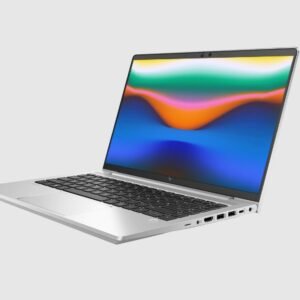
| Build & Design | Premium build materials; aluminium / metal elements; slim bezels; business durable design features |
| Warranty & Support | 1 year standard; options for security-bundle / extended support; UK business resale units often include HP’s business services |
Expert Review & User Experience
From a UX & CRO perspective, the EliteBook 830 G10 hits many sweet spots for UK business users:
- Portability: The 13.3-inch size and ~1.26 kg weight make it easy to carry around — good for commuting, meetings, or working from cafés or on the move.
- Display Quality & Comfort: With a WUXGA panel (~1920×1200), more vertical space is available, which helps with spreadsheets, writing, and reading. Anti-glare finishes reduce reflection in office lighting. Higher brightness models improve clarity outdoors or near windows.
- Performance for Business Use: The 13th Gen Intel CPUs, especially the i5-1335U and i7-1355U, deliver smooth performance for productivity tasks like Microsoft Office, web browsers, video calls, light content creation. Integrated Iris Xe graphics are sufficient for non-intensive graphics work.
- Security & Privacy: Features such as fingerprint reader, camera shutter, TPM, and optionally the HP SureView privacy screen help protect data. The inclusion of HP’s security software in some versions is a plus for companies that need compliance or want peace of mind.
- Connectivity & Ports: A good mix of modern (Thunderbolt/USB-C) and legacy ports (USB-A, HDMI) ensures compatibility without needing adapters. Useful in UK offices that may still rely on wired Ethernet or HDMI projectors.
- Battery Lifespan: Real-world battery life will depend heavily on display brightness, CPU load, but expect decent endurance under normal business use. Won’t compete with ultra-light laptops on battery for video streaming or heavy usage, but suitable for meeting to meeting and desk work.
Pros & Cons
Pros:
- Excellent build quality; feels premium and durable
- Strong performance for typical business tasks
- Very portable for a 13-inch business class machine
- Good security and privacy features built in
- Flexible port options and modern connectivity
- Display options with privacy screen for sensitive work
Cons:
- RAM often soldered; limited upgrade options in many models
- Display brightness in base models may be average; less ideal under strong sunlight
- Integrated graphics — not suited for demanding design, video editing, or gaming
- High-end models with more features (privacy screens, better displays, security bundles) come at significantly higher cost
Verdict & Buying Advice
For UK professionals who want a lightweight, secure, high performance 13.3-inch laptop that works well for hybrid work, frequent travel, or demanding office tasks, the EliteBook 830 G10 is an excellent choice.
If budget allows:
- Go for a model with 16-32 GB RAM and 512 GB SSD for best long-term usability.
- Try to select the brighter display options (≈400 nits) for better outdoor / window-light visibility.
- Include security bundles or privacy screen if you often work in public spaces or share your screen.
If your work involves graphics-heavy tasks, video editing, or gaming, you might need a model with dedicated graphics or a more powerful alternative.
Reviews
There are no reviews yet.