
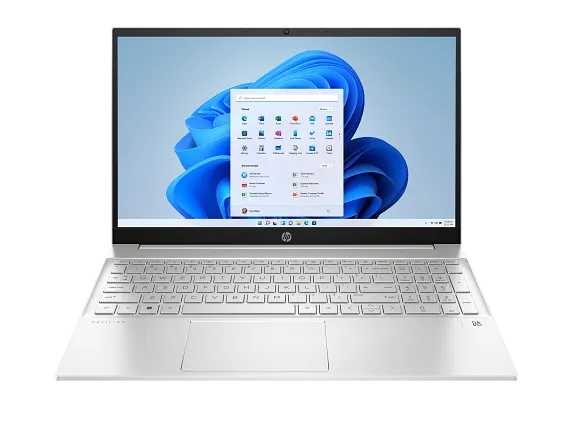
Features & Specifications
| Category | Details |
| Processor | 13th Gen Intel Core i5 or i7 (e.g. i5-1335U, i7-1355U, i7-1360P) |
| Graphics | Integrated Intel Iris Xe Graphics; some variants may have low-end dedicated graphics (MX class) depending on SKU |
| RAM | Typically 8-16 GB DDR4; dual SO-DIMM slots in many models for expandable memory |
| Storage | NVMe SSD, usually 512 GB; some models offer 1 TB |
| Display | 15.6-inch Full HD (1920×1080) IPS; anti-glare in many; brightness around 250-300 nits in base models |
| Colour Gamut & Finish | ~45% NTSC in standard models; neutral or “Fog Blue” / “Natural Silver” finishes; micro-edge / thin bezels in many variants |
| Ports & Connectivity | USB-C (often with DisplayPort/Power Delivery), USB-A ports, HDMI, headphone jack; Wi-Fi 6 or equivalent; Bluetooth 5.x |
| Keyboard & Input | Full-size keyboard (often with numeric keypad), backlit in many configurations; touchpad with gesture support |
| Webcam & Audio | 720p HD webcam; dual speakers with decent audio (Audio by B&O or HP Audio Boost in many) |
| Battery & Power | Battery size ~41 Wh in many units; moderate battery life under light use; fast charging available in some models |
| Weight & Dimensions | Around 1.7-1.8 kg depending on spec; thickness approx 1.7-1.8 cm in many models |
| Build & Design | Mixed materials (plastic + metal elements), stylish design options, decent for everyday carry; vents and cooling modest |
Expert Review & User Experience
From a UX & CRO perspective, the HP Pavilion 15 (13th Gen) delivers well for its segment:
- Balanced everyday performance: With the 13th Gen Intel chips, it handles office software, browsing, streaming, video conferencing, and light content creation smoothly.
- Display usability: Full HD IPS with anti-glare makes for comfortable views in typical indoor or classroom settings. However, under direct sunlight or very bright lighting, the base brightness might feel underwhelming.
- Design & Portability: It keeps a sensible form for a 15.6-inch laptop. While not ultralight, it’s acceptable for daily use, commuting, or moving between locations given its weight and size.
- Value features: Backlit keyboard, decent audio, a good SSD, and modern ports add to perceived value. Dual-slot RAM in some variants allows for upgrade, which boosts long-term usability.
- Battery life: Under light to moderate use (web browsing, document editing, video streaming) it should get through much of the work or study day. Heavy tasks reduce battery more quickly. Fast charging (if present) is helpful.
- Trade-offs: Display brightness, colour accuracy, and graphics performance are modest; integrated graphics suffice for basic visuals but not heavy gaming or GPU-intensive work. RAM base models (8 GB) may feel limiting for multitasking or future needs.
Pros & Cons
Pros:
- Good all-round performance at mid-range price
- Stylish design with modern finishes and colours
- Expandable RAM in many models improves future readiness
- Full-size keyboard + numeric keypad in many, improving usability for productivity
- Solid storage (fast SSDs) for boot and app load times
- Nice audio and display for media / video calls
Cons:
- Display brightness & colour gamut only fair in standard/base variants
- Integrated graphics limit performance for gaming or heavier graphics work
- Battery life under heavy load or with bright display panels drops significantly
- Build materials less premium in lower end SKUs; some plastic parts
- Premium features (higher RAM, better display, faster GPU) increase price substantially
Verdict & Buying Advice
The HP Pavilion 15 (13th Gen Intel) is a strong choice for UK users who want a reliable laptop for everyday tasks: study, office, streaming, light editing. To get the most value:
- Opt for at least 16 GB RAM & 512 GB SSD if budget allows to reduce need for upgrades.
- If you work in bright environments or near windows often, try to get a model with higher brightness display (if available) or consider anti-glare finish.
- Check whether the model includes backlit keyboard, fingerprint reader, and USB-C with power/docking capability — these small features improve user satisfaction.
- For gaming or graphics work, look for variants with dedicated GPU (if available), or consider more premium lines.

Reviews
There are no reviews yet.