
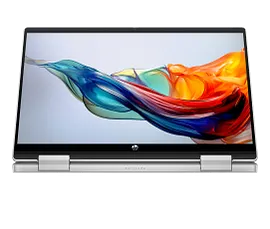
Features & Specifications
| Category | Details |
| Processor | Intel 13th Generation Core i5-1335U (10 cores, includes Turbo Boost) |
| Graphics | Integrated Intel Iris Xe |
| RAM | 8 GB DDR4-3200 (onboard in many models); some variants offer 16 GB |
| Storage | 512 GB NVMe SSD typical for mid-spec models |
| Display | 14″ Full HD (1920×1080), IPS multitouch, edge-to-edge glass, micro-edge bezels, roughly 250 nits brightness, ~45% NTSC colour gamut |
| Touch / Convertible | Yes — 360-degree hinge allowing laptop, tablet, tent, stand modes |
| Ports & Connectivity | USB-C (10 Gbps, PD / DisplayPort in many models), 2× USB-A, HDMI, headphone/mic combo, WiFi 6 / 6E, Bluetooth 5.x |
| Audio & Webcam | Speakers by Audio partners (B&O on some models), webcam (often 5MP in newer variants), dual array microphones |
| Battery & Weight | Battery capacity approx 43 Wh in many versions; weight roughly 1.5 kg |
| Build & Design | Silver finish “Natural Silver” option; backlit keyboard; fairly slim profile (~1.89-2.0 cm thickness) |
| Additional Features | HP True Vision camera, HP Audio Boost, multitouch display, decent screen-to-body ratio, fast charge support in many units |
Expert Review & User Experience
From a UX & CRO perspective, the Pavilion x360 14 (13th Gen) hits many good points for UK users:
- Flexibility is valuable: The convertible design adds usability in different contexts (presentations, sofa working, note-taking), which increases perceived value.
- Everyday performance: The Intel i5-1335U (10 cores) is solid for web browsing, video conferencing, document editing, streaming, and light multitasking.
- Display experience: FHD touch IPS looks good indoors; anti-glare helps. Brightness at ~250 nits is okay but not outstanding in very bright lighting or outdoors.
- Portability vs functionality: Weight (~1.5 kg) is fair for a convertible. You’ll notice it carrying but manageable for travel or daily carry.
- Noise/heat trade-offs: Under heavier usage (video editing, multitasking, high brightness) the device may get warm; fan noise may increase. But for regular light/moderate use it’s comfortable.
- Battery life: Mixed usage gives decent run time; charging speed, screen brightness, usage pattern will heavily impact how long it lasts.
- Value for money: For those who need the convertible / touchscreen, it provides good specs without the higher cost of premium 2-in-1s.
Pros & Cons
Pros:
- Versatile 2-in-1 (laptop/tablet/tent) design enhances usability in multiple scenarios
- Modern 13th Gen Intel CPU performs well in everyday tasks
- Good storage and SSD speeds in most units
- Decent display for indoor use; backlit keyboard, solid build
- Relevant ports and wireless connectivity included
- Comparatively affordable among 2-in-1s with these features
Cons:
- Display brightness and colour gamut are modest in base models; might struggle outdoors or in very bright rooms
- 8 GB RAM may limit heavier multitasking or future demands; 16 GB is better if budget allows
- Integrated graphics only — limited for gaming or GPU-intensive tasks
- Battery life reduced under heavy usage or with high brightness
- Convertible hinges, touch parts add complexity and possible wear over long term
Verdict & Buying Advice
If you want versatility (working in tablet/tent/laptop modes) and a good balance of performance, the HP Pavilion x360 14 (13th Gen Intel) is a strong pick for UK users—especially students, remote workers, or anyone who consumes media and does light content creation.
To get the best value:
- Aim for 16 GB RAM + 512 GB SSD if you can afford it, especially for smoother multitasking and longevity.
- If you often use the laptop in bright environments, try to choose a display variant with higher brightness or finish that reduces glare.
- Check warranty or service options; 2-in-1 laptops are more mechanically complex (hinges, touch parts).
- Prioritize models that have the features you’ll actually use: high-quality webcam, fast charging, decent speakers etc.


Reviews
There are no reviews yet.