
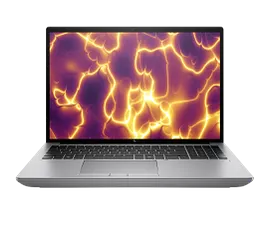
Features & Specifications
| Category | Details |
| Processor | Intel 13th Gen i7-13700HX or i9-13950HX (up to ~5-5.5 GHz boost) |
| Graphics | Discrete NVIDIA GPU options (e.g. RTX 3500 Ada, RTX 5000 Ada in higher SKUs) plus integrated graphics fallback |
| RAM | 16 GB / 32 GB / 64 GB DDR5; upgradable up to 128 GB via SO-DIMM |
| Storage | NVMe SSDs (512 GB / 1 TB typical; multiple slots for expansion) |
| Display | 16-inch IPS, WUXGA (1920×1200), 16:10 aspect ratio, anti-glare, ~400 nits brightness, 100% sRGB in many variants |
| Ports & Connectivity | USB-C (incl. Thunderbolt/USB4), multiple USB-A, HDMI, Mini DisplayPort, LAN/Ethernet, headphone/mic jack, Wi-Fi 6E, Bluetooth 5.3 |
| Webcam & Security | 5 MP webcam with privacy shutter / IR options; fingerprint reader; TPM 2.0; enterprise security tools included in many SKUs |
| Battery & Power | Large battery (~95 Wh) in many builds; 8-cell pack; AC adapter power often high for GPU loads |
| Weight & Dimensions | Approx 2.4 kg; thickness ~28-29 mm; fairly bulky due to cooling and high-performance parts |
| Build & Durability | Mobile workstation chassis built for durability; spill-resistant keyboard; good thermal design with vapor chamber in many models |
Expert Review & User Experience
From a UX & CRO perspective, here’s how the ZBook Fury 16 G10 stands out (and where it has trade-offs) for UK buyers:
- It delivers strong performance for professional apps: video editing, rendering, 3D modelling, simulations etc. CPU/GPU combos in this laptop can manage heavy workflows that lesser laptops struggle with.
- Expandability is excellent. RAM and storage slots give users ability to upgrade down the line, which boosts long-term value and confidence in investment.
- Display quality is solid: the 16-inch WUXGA with 16:10 helps with vertical space (good for editing, document work, side-by-side windows). Anti-glare and brightness in higher SKUs make working indoors or near windows more comfortable.
- The laptop is on the heavy side. For those who travel frequently or carry laptop all day, weight will be felt. Also, bulk is due to cooling needed for high-performance parts.
- Battery life is decent in lighter usage, but under heavy GPU/CPU load, battery drains fast. So, for mobile work with power demanding tasks, being near a power outlet often is necessary.
- Noise and heat: under load, fans will kick in loud. Thermal design is good, but every machine has trade-offs; performance under sustained load depends heavily on variant and cooling efficiency.
- Ports and connectivity are generous, which helps avoid dongles. Networking, security, and build quality are generally strong — features businesses care about.
Pros & Cons
Pros:
- Top-tier performance suitable for demanding workloads
- Excellent expandability (RAM, storage) giving long usable lifespan
- Solid display options and enterprise security features
- Good port variety & modern connectivity (Wi-Fi 6E, Thunderbolt/USB-C etc.)
- Strong build quality and durability
Cons:
- Heavy and thick — less portable for frequent travel
- Premium models come at high cost, especially with GPU and display upgrades
- Battery life under heavy usage is limited
- Fan noise & heat under load can be noticeable
- Some base models may have lower spec GPU/display which affect performance/quality
Verdict & Buying Advice
If you are a UK professional who runs resource-intensive workloads—such as video / graphics editing, engineering / CAD work, 3D modelling, or simulation—and you want a mobile workstation that you can upgrade over time, the HP ZBook Fury 16 G10 is a strong pick.
Here’s what to look for when choosing one:
- Choose at least 32 GB RAM (or more if your work demands) so you don’t bottleneck performance.
- Pick a discrete GPU version (e.g. RTX 3500 Ada or higher) if your software benefits from GPU acceleration.
- Prioritise the better display options if you work with visuals or want more color accuracy + outdoor readability
- Check warranty & service (on-site, parts availability) — in workstation class machines these matter.
- Be prepared for a heavier laptop—to carry comfortably, evaluate your travel habits.

Reviews
There are no reviews yet.